Advertising in Google as an SME: how to go about it?

The answer is yes! When someone enters a keyword into Google, such as, for example, "drupal website Leuven," that person is actually asking Google a question, namely, where to go in Leuven to have a Drupal website created. In other words, these are people with a strong buying intention. At that point, you want to show up with an attractive ad so you can attract those people to your business, right?
By the way, you can safely assume that your competition is already doing it. So right now, all those people are still clicking through to your competitor's website. High time to change that, right?

The ads displayed in Google are managed within a program called Google AdWords. There is a search network and a display network. In this article, we will zoom in on the search network.
Within the search network, everything revolves around keywords. The idea is to select keywords that are relevant to you, such as "web design Leuven" or "online marketing agency," for example. Then you can make sure ads for your business are shown when people search for these keywords.
Just keep in mind that your ads may not immediately appear at the top of the first place. Obviously, there is a lot of competition for popular keywords. This is why Google has devised an algorithm that determines the order in which your and your competitors' ads appear each time. Without going into too much detail, we would like to explain the most important factors in the algorithm. That way, you'll know immediately what to consider if you want to appear as high as possible.
Ad ranking is determined by your budget on the one hand and a quality score on the other. Now if you're thinking, "fine, I'll just allocate a lot of budget, and that's it," we have to disappoint you. Ads with a poor quality score are penalized, while ads with a high quality score are rewarded. Ads with a low quality score therefore cost much more money and yield much less. So it's important to find the right balance: a competitive budget and a good quality score will always yield the best results.
The quality score is influenced by three factors:

In the remainder of this article, we will give you some best practices to make your Google AdWords campaigns a success.
Before you begin, it's best to conduct thorough keyword research . Try to get inside your client's head and think about what terminology they use. For example, a client might be more likely to search for "send newsletter" instead of "e-mail marketing.
Several tools exist to find out what keywords your target audience is using. Within the AdWords environment, you can use the Keyword Planner. Other websites such as keywoordtool.io or answerthepublic.com can also be very interesting.


It's tempting to cram as many keywords into your account as possible, but it's still best to set your sights on the most efficient terms. These are terms that you know can actually produce results. For example, "get website made" is a better search term than "web design," because of the buying intent clearly behind that first search term.
Handy to know: there are different search types within Google AdWords. By default, your keywords are set to broad search. This means that your ad can also be shown for similar words, synonyms and plural forms. This may sound interesting, but in this way you will quickly encounter people who are actually looking for something else.

It is more interesting to use so-called modifiers for broad search. That way you keep more control over the keywords for which your ads appear.
By adding a '+' you indicate that a particular word must appear in the search query. For example: if '+facebook marketing' is your keyword, then your ad may appear with 'facebook marketing tips' or 'facebook marketing agency', but not with 'instagram marketing'.
In addition to modifiers for broad search, there are search types for word groups and exact search. With the search type for word groups, you specify that a particular phrase must appear in your search, while with exact search you specify that only that exact search should trigger your ad.
More information about the different search types and how to use them can be found here.
One last trick you can apply is to add exclusion keywords. You can do this if there are certain searches for which you definitely don't want to appear.

Adding exclusion keywords in your account is done through Keywords > Exclusion Keywords. You can add exclusion keywords at the campaign or ad group level.
For example, as an online marketing agency, we add the words "training" or "course" as exclusion keywords in our account, since our ads do not need to appear when people are looking for training to become online marketers themselves.

Earlier we already stressed the importance of relevant ads. To help you keep your ads as specific as possible, make sure you have a clear structure in your AdWords account.
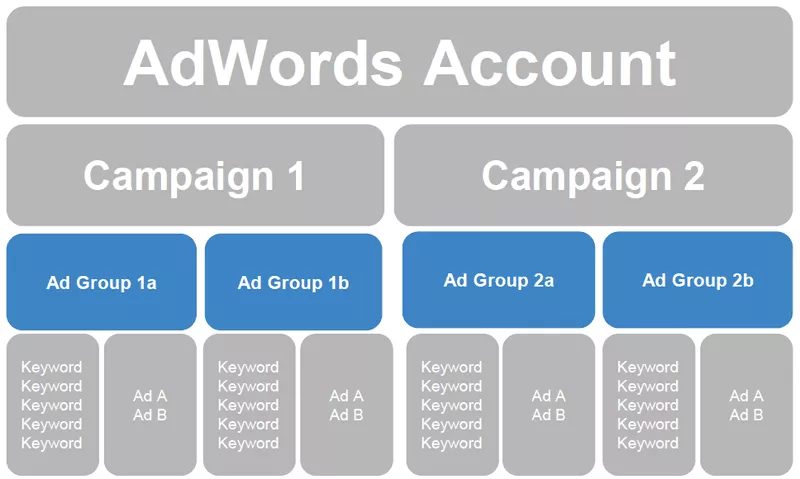
Every AdWords account is made up of campaigns, which in turn are made up of different ad groups. Each ad group can contain one or more ads tailored to one or more keywords.
It is best to provide a separate campaign for each of your product categories, for example, a campaign for web design, a campaign for digital marketing and a campaign for online strategy. Within each campaign, you then create one or more ad groups.
Make sure each ad group is focused around one term. For example, within the digital marketing campaign, you can create an ad group for facebook marketing, a group for email marketing and a group for instagram marketing. This way of working allows you to make your ads very specific. In your ad text for email marketing, you can then actually talk about emails instead of having to use the generic word digital marketing.
It is best to write several ads per ad group. The ad texts do not have to be very different from each other. On the contrary, working with multiple ads per ad group is the ideal way to experiment with the effect of small changes (e.g. another title or another call-to-action). In the results you can easily see afterwards which variant performed best. Based on this information, you can then further optimize your ads. Handy to know: Google automatically shows the ads that perform best more often than the variants that perform worse, unless you uncheck this option in the settings.

It may seem bizarre, yet it is wise to include the name of your business as a keyword in your AdWords account as well. This increases visibility when people search for your business in the search engine. You also push your competition down since Since the quality score for this term may be very high, this will also have a positive effect on your account. You also don't have to worry about the cost of such an ad since there may not be much competition on your brand name.
When writing ads, always think from your customer's point of view. Ask yourself what that person is looking for when they type in a particular keyword. For example: if someone types "copywriting website" into Google, you might consider putting "Need help writing persuasive copy for your website?" in your ad text. In other words, you are responding to the client's problems and already highlighting your solution.
Be sure to include call-to-actions in your ad copy. Phrases like "Contact us" or "Make an appointment" will actually make people click through to your ads faster.
A third trick to generate more clicks for your ads is to use ad extensions. These are small pieces of extra information you can add to your ads, such as sitelinks, your phone number, reviews or your location. Add as many extensions as possible: after all, they make your ads more relevant to potential interested parties.

More information about ad extensions can be found here.
When you set up an ad in Google AdWords, you can choose which page on your website people should land on. Again, keep it as relevant and specific as possible. We already explained to you that the landing page plays an important role in your quality score. It is very important that there is a clear link between the ad text and the text on your web page. People who clicked on an ad for social media marketing don't want to end up on a page about websites. But those same people don't want to end up on your general home page either. Make sure you send them straight to the page about social media marketing.
The bottom line is to make sure that the keyword you are advertising on also appears (multiple times) on your landing page. A good strategy is therefore to make sure that you have specific landing pages for your most important keywords where this keyword is often used. Can't do this within your current website? No problem. Tools such as Landingi allow you to quickly and easily set up landing pages that can be linked to your domain name.
Be sure to link your Google AdWords account to your website's Google Analytics account so you can measure what your ads are actually bringing in. If you have set up conversions on your website in Google Analytics, you can also start tracking these conversions within your Google AdWords account. That way, you can see which campaigns, ad groups, ads or even individual keywords generated the most conversions.
Explaining how to configure goals in Google Analytics we already gave you in one of our previous blog posts. Read it again here.

Establishing the link between Google Analytics & Google AdWords is done through Settings > Linked Accounts > Google Analytics. More information about that can be found here.
With AdWords, it is important to give it enough time. Don't expect an explosion of extra sales right away, but focus on the long term. The findability of your business will increase, people will find their way to your business faster and it will only benefit your brand awareness.